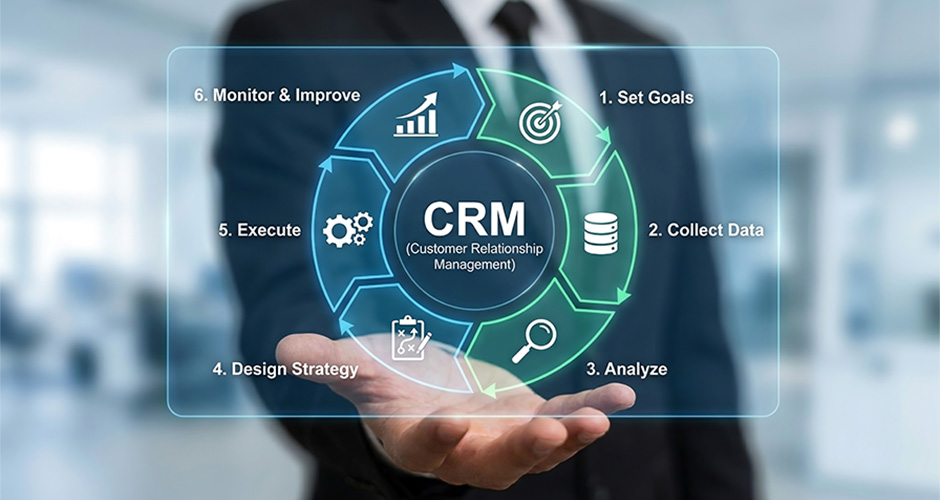
CRM data migration is no longer a once-in-a-decade IT project. In 2026, it has become a strategic business initiative. As companies scale faster, accumulate more customer data, and adopt AI-powered platforms, the pressure to migrate CRM data cleanly, completely, and without disruption has never been higher.
Why CRM Data Migration Matters More Than Ever in 2026
According to Gartner, over 60% of B2B companies plan to switch or upgrade their CRM platform by 2026. Yet more than 50% of those migrations are delayed or derailed due to poor data quality, inadequate planning, or underestimated complexity. The cost of a failed CRM migration isn’t just
financial, it means lost leads, broken pipelines, and frustrated sales and marketing teams.
The global CRM market was valued at $112.91 billion in 2025 and is forecast to reach $320.99 billion by 2034 Fortune Business Insights, growing at a CAGR of 12.4% Fortune Business Insights. That growth is increasingly being driven by AI: 65% of businesses have already adopted CRM systems with generative AI, and those that have are 83% more likely to exceed their sales goals Kixie. The focus has shifted from simply storing customer data to actively using it, yet despite this investment, failed migrations remain shockingly common. The cost isn’t just financial; it means lost leads, broken pipelines, and sales and marketing teams left working from data they can’t trust.
This blog covers everything decision-makers, Revenue Operations (RevOps) leaders, and marketing operations teams need to know:
a. What CRM data migration involves
b. Why companies are doing it now
c. What the risks are
and
d. How to execute it successfully with a HubSpot-ready framework.
What is CRM Data Migration?
CRM data migration is the process of transferring customer, sales, and operational data from one CRM system to another, or from legacy tools like spreadsheets and databases into a modern CRM platform. This includes contacts, accounts, deals, activities, notes, support tickets, and historical communication records.
Migration is distinct from data sync or integration. It is a one-time (or phased) movement of structured data, with the explicit goal of making a new CRM the single source of truth for your business.
What Does CRM Data Migration Typically Involve?
A complete CRM data migration covers the following scope:
- Data audit and discovery: Understanding what data exists, where it lives, and what condition it’s in.
- Field mapping: Aligning fields from your old system to the new CRM’s data model.
- Data cleansing: Removing duplicates, fixing incomplete records, and standardising formats.
- Migration execution: Moving data in batches or via API, with validation at each step.
- Testing and QA: Verifying data accuracy, completeness, and relationships post-migration.
- Go-live and monitoring: Activating the new CRM while monitoring for gaps and errors.
The scope and complexity of CRM data migration depend on the volume of records, the number of integrated tools, and the gap between old and new data models. For HubSpot migrations, for example, the platform’s native import tools simplify some steps, but data quality preparation remains entirely in your hands.
Why Companies Are Migrating CRMs in 2026
The decision to undergo CRM data migration is rarely made lightly. Here are the most common drivers accelerating migrations in 2026:
1. AI Readiness and Intelligent Automation
Modern CRM platforms like HubSpot now offer native AI features predictive lead scoring, AI content assistants, deal intelligence, and automated workflows. To take advantage of these, your data must be clean, structured, and complete. Companies migrating to AI-ready CRMs in 2026 are doing so specifically to unlock these capabilities.
2. Platform Consolidation
Many B2B companies are running three, four, or more disconnected tools a legacy CRM, a separate marketing automation platform, a sales engagement tool, and a customer success system. CRM data migration to a unified platform like HubSpot consolidates these into a single RevOps stack, reducing costs and improving visibility.
3. Scalability and Growth
As companies move from startup to mid-market, their old CRM often a basic tool or spreadsheet-based system can no longer handle the complexity of their pipeline, reporting needs, or team size. Migration to a scalable CRM is a growth necessity, not just a preference.
4. Poor Data Quality in Legacy Systems
Years of manual entry, system changes, and team turnover leave most legacy CRMs filled with duplicates, outdated contacts, and inconsistent records. Rather than cleaning the old system, many companies use migration as an opportunity to start fresh with a governed, clean dataset.
5. Regulatory and Compliance Requirements
GDPR, CCPA, and emerging data privacy laws require companies to know exactly what data they hold and how it’s used. Migrating to a modern CRM with built-in compliance features audit trails, consent tracking, and data retention policies is increasingly a compliance imperative.
Types of CRM Data Migrated: What Actually Moves?
When you’re planning a CRM migration, the first question isn’t how you’ll move the data, it’s what you’re moving. Different data types carry different risks, dependencies, and levels of effort, and lumping them all together is a fast track to missed timelines and messy outcomes.
| Data Category | Examples | Migration Priority |
| Contacts & Accounts | Names, emails, phone numbers, company records, job titles | Critical – migrate first |
| Deals & Opportunities | Pipeline stages, deal values, close dates, associated contacts | Critical – revenue data |
| Activities & Tasks | Call logs, meeting notes, email threads, follow-up tasks | High — context for sales team |
| Support Tickets | Customer issues, resolution history, support agent notes | Medium – depends on CS team |
| Marketing Data | Campaign associations, email engagement, lead source, lifecycle stage | High – needed for attribution |
| Custom Fields & Properties | Industry-specific fields, scoring data, custom segments | High – often most complex |
Custom fields and properties are typically the most complex element of any CRM data migration. Every business has unique fields built up over years, and mapping these accurately to the new CRM’s data model requires careful planning and validation.
CRM Data Migration Risks and Challenges to Plan For
CRM data migration projects fail more often than they succeed not because of technology, but because of under-preparation. Here are the most critical risks to address before you begin:
Data Loss and Incomplete Transfers
Records can be lost if field mappings are incorrect, data formats are incompatible, or migration batches fail silently. Always run parallel validation comparing record counts and key fields between source and destination after each batch.
Downtime and Business Disruption
A poorly timed or poorly managed migration can leave your sales team without access to critical pipeline data for hours or days. Planning a phased migration, scheduling go-live during low-activity periods, and having rollback procedures minimises this risk. See our detailed guide on how to avoid CRM migration downtime for a step-by-step approach.
Dirty Data Amplification
Migrating without cleaning first simply moves your problems into a new system. Duplicates, incomplete records, and outdated contacts become harder to fix once embedded in a new platform. Data cleanup must happen before migration, not after.
Hidden Costs
Most CRM migration budgets underestimate the cost of data preparation, custom field mapping, integration rebuilding, and team retraining. The true cost of CRM data migration extends well beyond the platform fees. Our hidden costs guide breaks down the full financial picture.
Team Adoption Failure
Even a technically perfect migration fails if your team doesn’t adopt the new CRM. Change management, training, and clear internal communication are as important as the technical execution.
CRM Data Migration Strategy: A Step-by-Step Overview
A successful CRM data migration follows a structured, phased approach. Here is a high-level overview of the process from discovery to go-live.
- Audit Your Existing CRM Data: Run a full inventory of what data exists, its quality, and completeness. Identify duplicates, gaps, and fields that need standardisation.
- Define Migration Scope: Decide what data to migrate (and what to archive or discard). Not everything in your old CRM needs to move.
- Map Your Data Fields: Create a detailed field mapping document that aligns every field in the source system to the corresponding field in the destination CRM. This is the most critical step in the process.
- Clean Your Data Before Migration: Deduplicate records, fill critical gaps, standardise formats (phone numbers, date formats, country codes), and segment by priority.
- Set Up the New CRM Environment: Configure your new CRM, in HubSpot’s case, set up properties, pipelines, teams, integrations, and permissions before any data arrives.
- Run a Test Migration: Migrate a small, representative sample first. Validate record counts, field accuracy, relationship integrity, and formatting. Fix issues before running the full migration.
- Execute the Full Migration: Run in batches by data category (contacts first, then companies, then deals, then activities). Monitor each batch for errors in real time.
- Validate and QA: Post-migration, run systematic checks: compare totals, spot-check records, test key workflows, and confirm that integrations are functioning correctly.
- Train Your Team: Before going live, ensure all users understand the new CRM, new processes, and where to find their data.
- Go Live and Monitor: Activate the new CRM as the primary system. Archive or decommission the old platform on a defined timeline. Monitor closely for the first 30 days.
For a detailed field-by-field mapping walkthrough, see our CRM Data Mapping Guide — the companion article to this pillar. (Mapping Custom Fields: A Technical Migration Guide – 3rd supporting blog hypertext linking)
Data Preparation and Cleanup: The Make-or-Break Phase
The single most important factor in a successful CRM data migration is the quality of your data before you begin. No migration tool, no matter how sophisticated, can compensate for dirty input data.
What Data Preparation Involves
- Deduplication: Identify and merge duplicate contacts, companies, and deals. Tools like HubSpot’s duplicate management or third-party deduplication tools can automate much of this.
- Standardization: Normalise inconsistent formats especially phone numbers, addresses, date formats, and job titles so they map cleanly to the new CRM.
- Enrichment: Fill in critical missing fields using data enrichment tools or manual research, particularly for high-value accounts.
- Segmentation: Tag records by priority tier so your migration runs highest-value data first, reducing risk to active pipeline.
- Consent and compliance audit: Verify that migrated contacts have valid marketing consent under GDPR/CCPA before they enter the new system.
See our dedicated data cleanup guide for a complete pre-migration data audit checklist and recommended toolset.
How to Avoid Downtime During CRM Data Migration
CRM downtime during migration is one of the top concerns for B2B leadership teams and rightly so. Sales teams without access to pipeline data lose deals. Marketing teams without contact data lose campaigns. Here’s how to minimise disruption:
- Phase your migration: Migrate data in stages rather than all at once, keeping the old CRM live until the new one is fully validated.
- Schedule off-peak: Run large migration batches during weekends or low-activity windows to minimise impact on active users.
- Freeze critical data: During the final cutover window, temporarily freeze data entry in the old system to prevent records being created that don’t get migrated.
- Build a rollback plan: Always have a documented procedure for reverting to the old CRM if a critical issue is discovered post-migration.
- Communicate proactively: Inform all CRM users of migration timelines, expected downtime windows, and what to do if they experience issues.
For a full downtime prevention playbook, refer to our companion article on avoiding CRM migration downtime.
CRM Data Migration Costs and ROI: What to Expect
Understanding the true cost of CRM data migration is essential for accurate budget planning and building the business case for investment. Costs vary significantly based on data volume, system complexity, and the level of support engaged.
Typical CRM Migration Cost Factors
- Data audit and cleanup: Often the largest single cost especially for legacy databases with years of unmanaged data.
- Field mapping and configuration: Requires skilled RevOps or HubSpot specialist time to complete accurately.
- Migration tooling: Native import tools, third-party migration platforms, or custom API work each carries different cost profiles.
- Integration rebuilding: Every third-party integration (marketing tools, support platforms, billing systems) typically needs to be rebuilt or reconnected post-migration.
- Training and change management: Often underestimated budget for formal training sessions and a hypercare period.
- Partner or agency fees: Working with a certified HubSpot partner like The Higher Pitch significantly reduces risk and accelerates time-to-value.
The ROI Case for CRM Data Migration
When executed correctly, CRM data migration delivers measurable returns. Companies that migrate to a modern, unified CRM typically see improvements across pipeline visibility (fewer lost deals), marketing attribution accuracy, sales cycle velocity, and team productivity through automation. According to Nucleus Research, CRM technology delivers an average return of $8.71 for every $1 spent, but only when the underlying data is clean and complete.
CRM Data Migration Best Practices and Readiness Checklist
Before initiating any CRM data migration, use this checklist to assess your readiness and reduce the risk of failure:
Pre-Migration Checklist
- Assign a dedicated migration owner (RevOps lead or project manager)
- Complete a full data audit — volume, quality, and field inventory
- Define migration scope: what moves, what archives, what’s discarded
- Create a detailed field mapping document reviewed by all stakeholders
- Complete deduplication and data cleanup before migration begins
- Set up and configure the new CRM environment fully before data arrives
- Run and validate a test migration with a representative data sample
- Confirm all integrations are mapped and ready to reconnect
- Brief all CRM users on the timeline, expectations, and their role
- Document a rollback plan and communicate it to the project team
Key Best Practices for CRM Data Migration Success
- Never migrate dirty data, clean before you move, not after.
- Migrate in batches by data type, contacts → companies → deals → activities.
- Validate at every stage, don’t wait until the end to check for errors.
- Involve your sales and marketing teams early, they know where the data gaps are.
- Work with a certified HubSpot partner for complex or large-scale migrations.
- Document everything, your migration log becomes your audit trail.
Future Trends: AI and Intelligent CRM Data Migration
CRM data migration is evolving rapidly, shaped by the same AI forces transforming the platforms themselves. Here’s what forward-thinking B2B teams should be aware of:
AI-Assisted Data Mapping
Modern migration platforms are beginning to use machine learning to auto-suggest field mappings based on semantic similarity between source and destination fields. This dramatically reduces the manual effort of field mapping for large, complex databases.
Real-Time Data Validation
AI-powered validation engines can now flag data quality issues in real time during migration, catching anomalies, format mismatches, and relationship errors as records are transferred, rather than in a post-migration audit.
Continuous CRM Migrations
As platforms update more frequently, the concept of a ‘one-time’ migration is giving way to continuous data orchestration, where data is synced, validated, and managed across systems on an ongoing basis. Tools like HubSpot Operations Hub are early examples of this shift.
Predictive Migration Risk Scoring
Emerging tools can analyse your existing CRM data and predict the likelihood of migration failure, flagging high-risk records, fields, and datasets before the process begins. This is particularly valuable for enterprises with millions of records.
Get Your CRM Data Migration Right from Day One
CRM data migration in 2026 is a strategic investment, not just a technical task. The companies that execute it well emerge with a clean, unified, AI-ready data foundation that powers better marketing, faster sales cycles, and stronger customer relationships.
The companies that rush it, skip the data preparation phase, or underestimate the complexity end up migrating their problems into a new system and paying for it in lost productivity, poor reporting, and team frustration.
The difference comes down to planning, process, and the right partner.
The Higher Pitch is a certified HubSpot Partner with deep expertise in CRM data migration strategy, HubSpot onboarding, and RevOps implementation for B2B tech companies.
FAQ: CRM Data Migration
Ready to Migrate Your CRM the Right Way?
The Higher Pitch is a certified HubSpot Partner specialising in CRM data migration, HubSpot onboarding, and full-funnel RevOps implementation for B2B tech companies. We have helped startups, mid-market firms, and enterprise brands migrate cleanly without data loss, without downtime, and without the headaches.
Book a free CRM Migration Readiness Consultation with our team today. We’ll audit your current CRM data, identify migration risks, and build you a clear, costed migration roadmap — at no charge.
Author