In a sales-led business, a new customer who struggles gets a call. In a product-led business, they get nothing, because nobody knows they struggled. They close the tab, and the only trace is a row in a database.
That asymmetry is why onboarding carries so much weight in product-led growth. It is the only part of the experience that has to work without a human, for a stranger, on their real work, the first time. This article covers how to find the moment that matters, how to shorten the path to it, what to automate, and how to measure whether any of it is working.
Quick Takeaway
Product-led onboarding is not a tour of your interface. It is the shortest path from sign-up to a result the user actually wanted. Most onboarding improvements come from deleting steps rather than adding guidance.
Product-Led Onboarding Is Designed Around a Result, Not an Interface
Product-led onboarding is the in-product experience that takes a new user from sign-up to their first meaningful result, without requiring a human to guide them.
The distinction that matters is between explaining and achieving. A product tour explains what the buttons do. Product-led onboarding gets the user to an outcome: a contract analyzed, a report built, a workflow running, a bug traced. The tour can be part of it, but only where it removes a specific obstacle.
For general onboarding practice, including the customer success side, see our earlier piece on user onboarding for product success. This article focuses on onboarding as the growth mechanism in a product-led motion, which our pillar guide to product-led growth sets out in full.
Onboarding Is Where Product-Led Growth Usually Fails
Three reasons it carries disproportionate weight:
It is the only stage with no human safety net. Every other stage can be rescued by a person. This one cannot, by definition.
The base rate is unforgiving. Atlassian’s FY2024 annual report states that, historically, a majority of users never convert to a paid version from free trials or limited free versions. That is a company with an exceptionally well-developed self-service model disclosing that most free users do not pay. Improving activation is one of the few levers that moves that arithmetic.
Expectations have risen. In his Sacra interview, Blake Bartlett argues that when a user can sign up and have something that seemed impossible delivered within seconds, “magic” becomes the new standard for time to value, and a product that takes three sessions to reach an aha moment will start to see a user activation problem.
There is also a commercial reason to care beyond conversion. 6sense’s 2025 research found that in 85% of successful purchases buyers had prior direct experience with the vendor. A user who signs up, fails to get anywhere and leaves has not just failed to convert. They have formed an impression that will be in the room the next time your category is evaluated.
The Aha Moment Is Found in Data, Not in a Workshop
The aha moment is the point where the user understands why the product is worth their time. It is specific to your product and should be identified from behaviour rather than assumed.
A practical way to find it:
- Split users into cohorts by whether they were still active after a defined period, such as four weeks.
- List candidate early actions: completing setup, importing data, creating a first object, inviting a colleague, hitting a result.
- Compare frequency of each action in the first session or first week between retained and lapsed users.
- Look for the action with the widest gap, then check whether it holds across segments.
- Validate causally where you can, by changing onboarding to drive that action and seeing whether retention follows. Correlation alone can mislead: engaged users do more of everything.
Write the result as a sentence anyone in the company could repeat. “A new user has seen the value when they have connected one real data source and viewed their first report.” That sentence becomes the target for everything upstream.
Time to Value Is the Metric Onboarding Exists to Reduce
Time to value is the elapsed time from sign-up to the user reaching the defined activation moment.
Bartlett’s guidance is to deliver the aha moment in the first or second session. Whether that is realistic depends on your product, but the direction is right: every day between sign-up and value is a day in which the user’s original motivation fades.
Four levers usually move it:
- Remove prerequisites. Anything the user must obtain before they can start, such as an API key, an admin’s permission or a clean data export, is a delay you control more than they do.
- Offer a starting point. Templates and realistic sample data let a user see the output before they have their own inputs ready.
- Do the work for them where you can. Pre-fill, auto-detect and import rather than asking the user to configure.
- Reorder, do not just shorten. Value first, administration second. Most settings can wait until after the first result.
Friction Is Everything Between Sign-Up and Value That Does Not Serve It
Audit the path by walking it as a new user, with a stopwatch, on a real task. Every screen gets one question: does this move the user toward the activation moment?
| Friction type | What it looks like | Usual fix |
| Form friction | Long sign-up forms, forced verification before first use | Ask for the minimum, defer the rest |
| Setup friction | Configuration, permissions or integrations required before anything works | Provide defaults and a sample path |
| Cognitive friction | Empty states with no obvious next action | Show one clear next step per screen |
| Data friction | The product is useless until the user imports data | Sample data, templates, partial imports |
| Organizational friction | The user needs an admin, a budget holder or IT | Make the internal ask easy to forward |
| Trust friction | Unclear data handling or permissions at the moment of upload | Explain what happens to the data, in place |
Table 1: Common friction types in B2B onboarding.
The last two are specific to B2B and are routinely missed in consumer-derived onboarding advice. A user can be completely convinced and still be blocked by a colleague. Our pieces on reducing friction in the user experience and role-based design for B2B dashboards go deeper on the design side.
In-Product Guidance Should Appear at the Moment of Need
Guidance works when it is contextual and dismissible, and it fails when it is a queue of modals standing between the user and their task.
Practical principles:
- Trigger on behaviour, not on arrival. Help that appears when a user hesitates on a step is useful; a tour that fires on first login is an obstacle.
- One thing at a time. A checklist showing progress is easier to act on than a tour covering nine features.
- Personalize by role, not by name. Someone who signs up as an administrator needs a different first path from an individual contributor. Inserting a first name into a message is not personalization.
- Always allow escape. Users who already know what they want should be able to skip everything without penalty.
Interfaces that anticipate what the user needs next are the more advanced version of this, which we covered in predictive interfaces for B2B SaaS.
Behavioural Data Turns Onboarding Into a System That Improves
Onboarding improvement is an ongoing measurement loop, not a redesign project. The requirement is instrumentation: events for each step, with timestamps and account identifiers, so you can see where users stop.
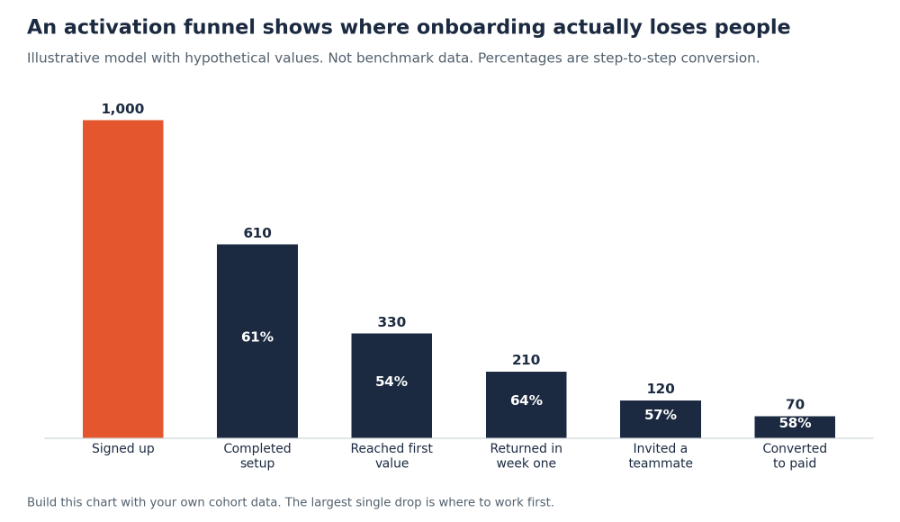
Figure 1: Illustrative model with hypothetical values, not benchmark data. Build the same chart from your own cohorts; the largest single drop is where to work first.
Read it by cohort rather than in aggregate, because a change in acquisition mix will move the numbers without anything in onboarding changing. Segment by role, company size and acquisition source, since a drop that looks moderate overall is often severe for one segment.
Bartlett’s warning applies here too: without telemetry you are flying blind, and traditional B2B tools cannot simply be force-fitted into a product-led model. Our piece on customer experience analytics covers the measurement stack.
AI Can Shorten Onboarding, and Can Also Paper Over Product Problems
Useful applications in B2B onboarding include:
- Setup assistance: interpreting a user’s data or connecting a source without manual mapping.
- Contextual answers: answering questions in the product, grounded in your documentation, at the moment they arise.
- Adaptive paths: changing the onboarding sequence based on role and early behaviour.
- Drop-off detection: flagging accounts that stall at a known step and triggering the right response, whether that is guidance or a human.
- First output generation: producing a draft, a template or an initial configuration so the user starts from something rather than nothing.
Two cautions. First, an AI assistant layered on a confusing product produces fluent answers about a confusing product; it raises the cost of the underlying design problem rather than solving it. Second, in B2B onboarding the data being uploaded is often sensitive, so what your AI features do with it needs to be explained at the moment of upload. Our piece on AI marketing automation covers the automation side more broadly.
Measure Activation, Then Everything That Follows From It
| Metric | What it tells you | Common trap |
| Activation rate | Share of new users reaching the defined value moment | Defining activation as a step you control rather than one the user values |
| Time to value | Median time from sign-up to activation | Reporting the mean, which a few slow users distort |
| Step conversion | Where users stop in the onboarding sequence | Reading it in aggregate instead of by cohort and segment |
| Week-one return rate | Whether first value was real enough to bring them back | Counting any login rather than meaningful use |
| Invitation rate | Whether the product is spreading inside the account | Prompting invitations before the user has seen value |
| Activated-to-paid rate | Whether activation actually predicts revenue | Assuming it does without checking against cohorts |
Table 2: Onboarding and activation metrics.
The last row is the one that keeps the definition honest. If activated users convert at a similar rate to unactivated ones, the activation definition is measuring the wrong thing. The wider metric set is in Product-Led Growth Metrics.
A B2B Product-Led Onboarding Example
Consider a hypothetical workforce scheduling product sold to operations managers in multi-site retail and hospitality businesses. This is an illustration, not a client.
The problem. Sign-ups are healthy, but most new accounts never produce a schedule. Onboarding asks the user to add every location, import the full staff list and set availability rules before anything can be generated.
Finding the moment. Cohort analysis shows that users still active after four weeks almost all published a schedule for at least one location in their first session. Users who only imported staff data rarely returned. Activation is redefined as publishing a first schedule, not completing setup.
Rebuilding around it. The flow is reordered: choose one location, add the handful of people who work there, generate a schedule, publish it. Full import, availability rules and other locations move to after the first published schedule. Users without staff data can start from a sample roster.
Adding assist. Accounts that add more than three locations or invite more than five colleagues are flagged as product-qualified leads, and a specialist reaches out with help on rollout rather than a pitch.
What is measured. Activation rate and time to first published schedule, by company size; the largest remaining drop-off step; week-one return rate; and whether activated accounts convert at a materially higher rate than the rest.
THP Studio Perspective
- Our uncomfortable observation from onboarding reviews is that the fix is almost always subtraction, and almost every proposal is addition. Teams arrive wanting a tour, a checklist, a welcome sequence and an in-app assistant. What usually moves activation is removing six form fields, deferring verification, and letting a user do one real thing before being asked to configure anything. Adding guidance is easier to ship and easier to demo internally than deleting a step someone once fought for. It is also, in our view, why so many onboarding projects finish on time and change nothing.
Frequently Asked Questions
Key Takeaways
- Treat onboarding as the only stage with no human safety net, and design it around a result rather than a tour.
- Derive the activation moment from cohort behaviour, then validate it by testing whether driving that action improves retention.
- Reduce time to value by removing prerequisites and reordering value ahead of administration.
- Watch for the two B2B-specific frictions consumer advice misses: needing a colleague’s permission, and uncertainty about sensitive data.
- Check that activated users actually convert better; if they do not, the activation definition is measuring the wrong thing.
Work With THP’s Design & UX Studio
- THP’s Design & UX Studio works on first-run experiences, user journeys and conversion-focused design for B2B products. If sign-ups are healthy but new users are not reaching value, an onboarding audit is usually the fastest place to find the gap.
Author