
Your prompt list is the most consequential decision in HubSpot AEO, and it is the one most teams make in five minutes by accepting whatever the tool suggests.
Every number the product reports is a percentage of that list. Choose broad educational questions and you will get a comfortable score that tells you nothing. Choose the questions a buying committee asks when it is deciding, and you will get an uncomfortable score that tells you exactly what to do. This article covers how to make that choice well. For the tool overall, see our guide to HubSpot AEO.
Quick Takeaway
- Prompts are not keywords. A keyword is what someone types to find a page; a prompt is a question someone asks expecting an answer with vendor names in it. Prioritize the prompts where a name gets recommended, because those are the ones that decide shortlists.
What Prompt Tracking Does
In HubSpot AEO, prompts are the questions people might ask answer engines when looking for brands, products or services related to your business, and prompt tracking runs them daily to record whether your brand appears and which competitors are mentioned.
HubSpot’s documentation states that prompts are generated using your HubSpot data, audience and offerings, that AEO analyzes them to determine whether your brand appears and which competitors are mentioned, and that prompts run daily. It also advises reviewing performance across multiple days or weeks before evaluating trends.
The prompt view reports total prompts, average visibility, total responses and total citations, and lets you open an individual prompt to read the exact response each engine returned.
Why Prompts Matter More Than Keywords
| Aspect | SEO keyword | AEO prompt |
| Form | A phrase typed to find pages | A question asked expecting an answer |
| Length and specificity | Usually short | Often long, with context and constraints |
| What success looks like | Your page ranks | Your brand is named in the answer |
| Result for the user | A list of options | A recommendation, often with two or three names |
| Your influence | Mostly your own page | Whatever sources the model draws on |
Table 1: Keywords and prompts compared.
The row that changes behaviour is the fourth. Search returns a list; an answer engine often returns a shortlist. There is no page two, so a brand that is not named is simply absent, and nobody reports its absence. That is why prompt selection should be weighted toward the questions that produce vendor names.
How HubSpot Suggests Prompts
After you confirm brand details, competitors, products and ICPs, HubSpot generates suggested prompts. Its documentation states that for Marketing Hub Professional and Enterprise accounts, prompts are generated using your business context, which is one of two features that differ from the standalone product.
You can generate more (HubSpot says this adds another 8 to 15), add prompts manually, or edit any of them. Two documented details worth knowing:
- Language follows the ICP. HubSpot’s guidance is that prompts should be written in the language the selected ICP would naturally use in their location, giving the example of Spanish for travel agents in Spain.
- Deletions take time. After deleting prompts, HubSpot notes it can take up to 72 hours for changes to be reflected.
Treat the suggested list as a starting point. It is generated from what you told the tool about yourself, so it will tend to reflect how you describe your market rather than how buyers describe their problem.
The Four Buyer Journey Phases, and Why They Change Everything
HubSpot assigns each prompt a single buyer journey phase based on intent, and notes this classification helps interpret visibility metrics in the correct context.
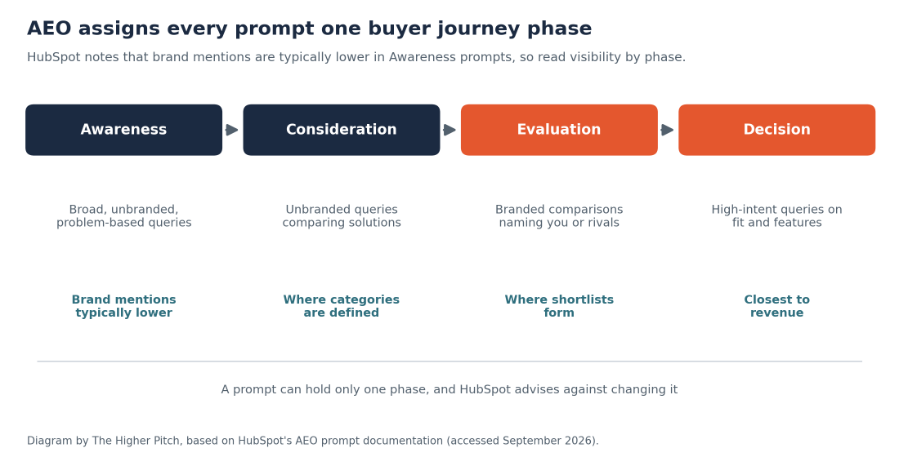
Figure 1: The four phases. Diagram based on HubSpot’s documentation.
- Awareness: broad, unbranded, problem-based queries, where HubSpot notes brand mentions are typically lower.
- Consideration: unbranded queries where users compare available solutions.
- Evaluation: branded comparisons that explicitly name your company or competitors.
- Decision: high-intent queries focused on whether a specific product or company meets defined needs or features.
HubSpot states a prompt can hold only one phase and that changing the stage is not recommended.
The practical consequence: an Awareness-heavy prompt set produces a low score that reflects the nature of the questions, not a marketing failure, while a Decision-heavy set produces a smaller, harsher, far more useful number. Most teams need a deliberate mix, weighted toward Evaluation and Decision.
How to Choose High-Value Prompts
Your allowance is limited: HubSpot publishes 25 tracked prompts daily on the trial, standalone product and Marketing Hub Professional, rising to 50 on Enterprise. With that constraint, four criteria:
- Does the answer name vendors? If a question returns a definition rather than a recommendation, being absent costs you little.
- Does a buyer ask it near a decision? Weight toward the questions asked once a shortlist is forming.
- Is it phrased the way a buyer speaks? Use the language from sales calls, not your category page.
- Does it reflect a real constraint? Industry, company size, integration, compliance and budget constraints all appear in real prompts and rarely in generated ones.
| Weak prompt | Why it underperforms | Stronger version |
| “What is marketing automation?” | Definitional; rarely names vendors | “Which marketing automation platform is best for a 200-person B2B company?” |
| “Best CRM software” | Extremely broad, dominated by large brands | “Best CRM for a manufacturing company that needs ERP integration” |
| “[Your brand] reviews” | You will appear by definition | “[Your brand] vs [competitor] for mid-market teams” |
| “Benefits of X” | Educational content, no recommendation | “What should I look for when choosing an X provider?” |
Table 2: Improving prompt selection.
Note the third row. Branded prompts where you obviously appear inflate your score without informing anything. Keep a few to monitor sentiment and description accuracy, not as the bulk of your list.
Mapping Prompts to Products and ICPs
Since prompts are generated from your products and ICPs, HubSpot’s documentation is clear that these selections decide how visibility is analyzed. Build the map deliberately:
| ICP | Their trigger question | Phase | Product it relates to |
| Ops leader, mid-market manufacturer | “How do I reduce unplanned downtime on packaging lines?” | Awareness | Predictive maintenance |
| Same | “Predictive maintenance vs scheduled maintenance for food plants” | Consideration | Same |
| Same | “[Brand] vs [competitor] for food manufacturing” | Evaluation | Same |
| Same | “Does [brand] integrate with our existing ERP?” | Decision | Same |
Table 3: A worked prompt map for one ICP. Hypothetical, for illustration.
HubSpot also supports organizing prompts into groups, which is how you track visibility by topic, product or brand rather than reading everything as one blended figure.
Analyzing Prompt-Level Performance
Open an individual prompt and HubSpot’s Prompts Analysis tab provides: competitor visibility over time, prompt visibility rate versus competitors, citations by channel, top citations overall, citations by content type, owned domain citation rate versus competitors, and citations with brand mention rate versus competitors.
That is a complete diagnosis for a single question. The most valuable thing you can do here is not look at the charts at all: read the actual answer text each engine returned. You will learn how you are described, which competitors are named alongside you, and what the recommendation is based on.
A simple weekly habit: read the full responses for your five most commercially important prompts. Fifteen minutes, and it generates more content ideas than any keyword tool.
Finding Missing AI Search Opportunities
Where the gaps usually are:
- Comparison prompts you are absent from. The most expensive gap, and usually solvable with comparison content plus third-party presence.
- Constraint prompts. Integration, compliance, company size and industry-specific questions, where a specific answer beats a general one.
- Prompts where competitors appear and you do not, visible in the prompt visibility rate versus competitors report. See competitor analysis.
- Prompts where your site is cited but you are not mentioned. Your content is feeding someone else’s recommendation. See citation analysis.
- Prompts that only one engine answers with your name, which points to a source concentration issue.
Turning Prompt Insights Into Content
The route from a prompt gap to a published answer:
- Read the answer and note who is named and what the recommendation is based on.
- Check the citations for that prompt: which content types and channels are being used.
- Decide the format from the evidence, not from habit. If comparisons and user reviews dominate, another explainer will not help.
- Write the answer first. Lead with a direct answer, then support it.
- Decide the channel. If the citations are third-party, the action is outreach rather than publishing.
- Record the date you published or placed something, so impact can be read against it.
HubSpot’s Recommendations tab automates part of this, which we cover in AEO recommendations. The loop of publishing, measuring and revising is the same pattern we describe in SEO growth loops.
Maintaining a Prompt Strategy
| Cadence | What you do | Why |
| Weekly | Read full responses for your top five commercial prompts | Detail the charts do not show |
| Monthly | Review visibility by phase and group | Spot drift in specific topics |
| Quarterly | Review the whole prompt set against new sales-call language | Buyer questions change |
| Quarterly | Retire prompts that never inform a decision | The allowance is finite |
| On product change | Add prompts for new products or segments | Coverage follows the offer |
Table 4: Keeping a prompt set useful.
THP Studio Perspective
- The temptation with a limited prompt allowance is to spend it on breadth, covering every topic your category touches. We would spend most of it on the last two phases instead. A brand that appears in every educational answer about its category and is never named when someone asks which vendor to choose has a visibility score that looks respectable and a pipeline that does not benefit. Twenty-five prompts is enough to cover the questions a buying committee actually asks before a shortlist forms. It is nowhere near enough to cover a category.
Frequently Asked Questions
Key Takeaways
- Treat the prompt list as the most consequential setup decision, since every reported number is a percentage of it.
- Weight the allowance toward Evaluation and Decision prompts, where answers actually name vendors.
- Phrase prompts in buyers’ language and include real constraints, which generated prompts usually miss.
- Read full answer text weekly for your top commercial prompts; it produces better content ideas than any chart.
- Let citation evidence decide the format and channel of your response, rather than defaulting to another blog post.
Work With THP’s Content & Communications Studio
- THP’s Content & Communications Studio builds B2B content strategy grounded in the questions buyers actually ask. If your prompt set is generating a score but not a content plan, translating prompt gaps into publishing and outreach is where we would start.
Author